
LG error code CL
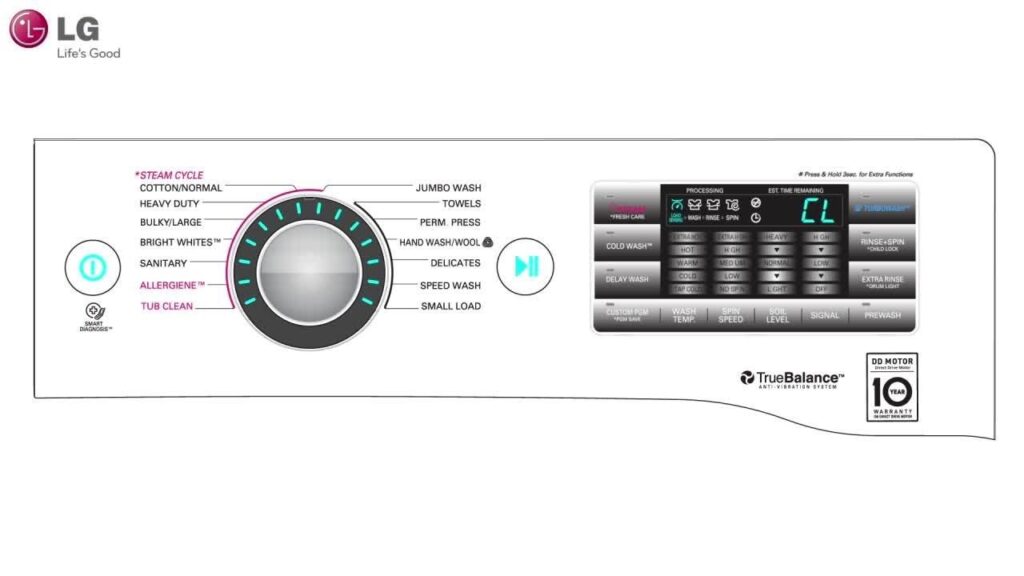

CL on an LG washing machine means Child Lock – the machine’s controls have been locked to prevent accidental operation. It is not a fault. On most LG machines, holding down the Temperature and Eco/Rapid buttons simultaneously for 3 seconds deactivates the child lock. If this does not work on your specific model, check the instruction manual for the correct button combination.
What CL Means on an LG Washing Machine
CL stands for Child Lock. When the child lock is active, the machine displays CL on its panel and will not respond to button presses or programme changes. The child lock can be activated accidentally – by a child pressing buttons, or by a combination of buttons being held during normal use.
This is not a fault or error code in the usual sense. There is nothing wrong with the machine – it simply needs the child lock deactivated before it will accept commands again.
How to Turn Off Child Lock on an LG Washing Machine
-
Locate the Temperature and Eco (or Rapid) buttons on the control panel.
The exact button labels vary by model. Look for a button labelled Eco, Rapid, or a similar option button that sits alongside the Temperature button.
-
Hold both buttons down simultaneously for approximately 3 seconds.
The CL indicator should clear from the display and normal operation will resume. The machine may beep to confirm the lock has been deactivated.
-
If this does not work, check the instruction manual for your specific model.
The button combination to activate and deactivate the child lock varies between LG models. The correct combination for your specific machine is in the instruction manual. If the manual is not available, download it from our washing machine user manuals page using the model number on the machine’s door frame sticker.
If the CL indicator returns repeatedly and there is no obvious reason why the child lock is being activated, check whether a specific button is sticking or being inadvertently held during operation. A button with a faulty contact can trigger the lock combination without deliberate input.
Can’t find your manual?
Related Guides
 Washing Machine Won’t Start
When a machine that won’t start has a genuine fault rather than an activated child lock or door issue.
 Washing Machine User Manuals
Links to official manual download pages for all major UK washing machine brands.
 Children and Pets Around Appliances
Safety guidance on child locks, unsupervised access to appliances, and keeping children and pets safe.
Washing Machine Lights FlashingHow to read and interpret flashing indicator lights and display codes on washing machines.
Frequently Asked Questions
What does CL mean on an LG washing machine?
CL means Child Lock. The machine’s control panel has been locked and will not accept button presses or programme changes until the child lock is deactivated. It is not a fault. Hold the Temperature and Eco or Rapid buttons simultaneously for approximately 3 seconds to deactivate it, or check the instruction manual for the correct combination for your specific model.
How do I turn off child lock on an LG washing machine?
On most LG models, hold the Temperature button and the Eco or Rapid button simultaneously for 3 seconds. The CL display should clear and the machine will respond to commands normally again. If this does not work, the correct button combination for your model is in the instruction manual. Download the manual using the model number on the machine if the original is not available.
Why does my LG washing machine keep showing CL?
If the child lock is being activated repeatedly without you intentionally pressing the combination, check whether any buttons on the control panel are sticking or intermittently making contact. A faulty button contact can trigger the lock combination without deliberate input. If the machine is otherwise working normally when the child lock is not active, this is likely the cause.
2 Comments
Grouped into 2 comment threads.
0 replies Wow thank you very much, it cleared my error immediately.
0 replies LG error code CL Thanks about Child Lock release advise. My machine stopped to CL after power fail.
LG error code CL
Thanks about Child Lock release advise.
My machine stopped to CL after power fail.
Wow thank you very much, it cleared my error immediately.