
Logik Washing Machine Error Codes
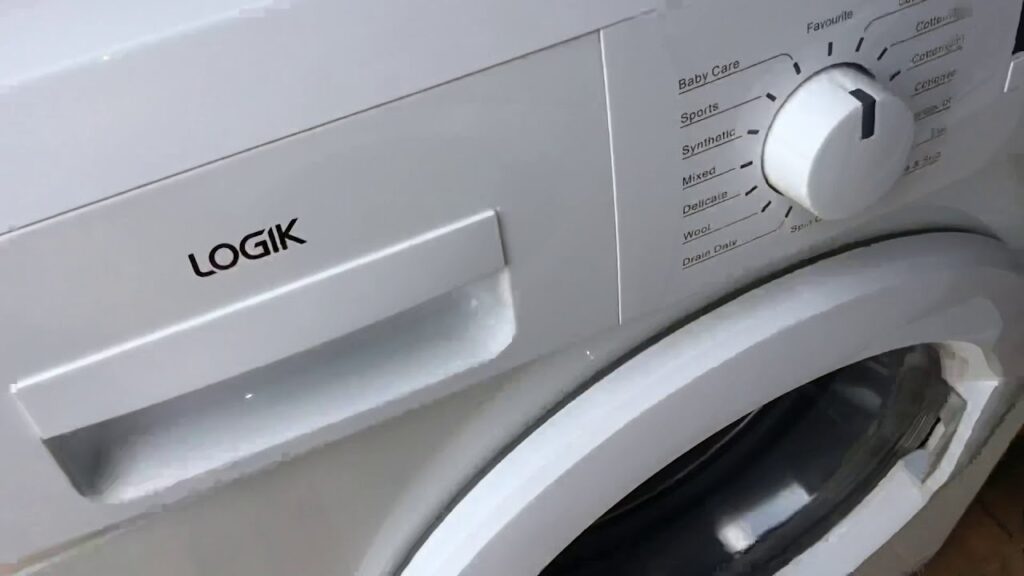

Logik washing machines display error codes as E followed by a one or two-digit number – E01, E02, E03 and so on. Logik is the Currys own-brand label, and the machines are produced by Vestel, the Turkish manufacturer that supplies many budget brands across Europe. The most commonly seen Logik codes are E01 (door lock), E02 (fill fault), E03 (drain fault), and E04 (overflow). Find your code in the table below.
Codes covered on this page
E02 – Fill
E03 / E10 – Drain
E04 – Overflow / foam
E05 / E11 – Heating
E06 / E60 – Motor
E07 – Pressure switch
E08 – Triac
E09 – NTC sensor
E12 – Communication
Who makes Logik washing machines?
Before looking up specific codes, it helps to understand the brand. Logik is the budget-tier own-brand label sold exclusively through Currys (and previously Currys/PC World and Dixons). Logik does not manufacture appliances itself. The washing machines sold under the Logik brand are produced by Vestel, the Turkish electronics and appliance manufacturer based in Manisa, which is one of the largest white goods producers in Europe.
Vestel produces washing machines for a number of UK and European budget brands as well as supplying its own-branded range. The control boards, error code systems, and many internal components in Logik washing machines are therefore Vestel-derived rather than unique to Logik. This matters for repairs – spare parts and diagnostic information for equivalent Vestel machines are directly applicable to Logik models.
 Display models – E codes
Most Logik machines with a digital display show fault codes as E followed by two digits – E01, E02, E03 and so on. Some models also show the same fault as a lowercase variant (e01, e60). Write the exact code down before doing anything else.
Older models without displayOlder Logik machines without a digital display use combinations of indicator lights to signal faults. The pattern of which lights are on, off, and flashing identifies the fault category. Cross-reference with the E code table below.
 Resetting after clearing a fault
To clear a Logik error code, press and hold the START/PAUSE button for approximately 5 seconds. For a deeper reset, switch the machine off at the wall socket, wait 60 seconds, and switch back on. Clearing the code does not fix the underlying fault – if the same code reappears, the fault needs diagnosis and repair.
 Spare parts and repairs
Logik washing machines can be repaired by qualified appliance engineers, with spare parts available through Currys and through independent suppliers carrying Vestel-compatible parts. Common parts including pumps, door interlocks, heating elements, and thermistors are widely available.
Which Logik codes are seen most often?
Across the field, four code groups account for the majority of Logik washing machine fault callouts. Knowing which they are helps narrow the diagnosis before you open anything up.
Drain fault – almost always a blocked filter
Door lock – often the interlock at 5-10 years
Overflow – usually too much detergent, not a fault
Heating – element, thermistor, or limescale
Logik washing machine error codes – complete reference
| Code | Fault description | Most likely causes | Check first |
|---|---|---|---|
| E01 / E30 | Door lock fault – machine not detecting door is closed and locked | Door not fully closed. Failed door interlock mechanism. Faulty wiring to the door lock circuit. Damaged door interlock. Broken door handle preventing the door from latching. Faulty PCB. | Open and firmly close the door, ensuring nothing is trapped in the seal. If the code persists, test the door interlock for continuity. See also washing machine door won’t open. |
| E02 | Water inlet fault – machine not filling within the expected time | Tap closed or partially closed. Kinked or trapped inlet hose. Blocked inlet hose filter. Low mains water pressure. Failed inlet valve solenoid. In cold weather, frozen inlet hose. | Confirm the tap is fully open. Straighten the inlet hose. Unscrew the inlet hose from the back of the machine and clean the small mesh filter inside the inlet port. |
| E03 | Drain / pump fault – machine unable to drain water within the expected time | Blocked pump filter (the most common cause). Kinked or blocked drain hose. Standpipe too high. Foreign object blocking the pump impeller. Failed drain pump motor. Wiring fault to drain pump. | Clean the pump filter behind the small access panel at the bottom front of the machine. Place towels and a shallow tray in front before opening as water will flow out. See washing machine not draining and no blockage and still not draining. |
| E04 | Overfill / overflow detected – pressure sensor reading too much water | Excessive foam from too much detergent (most common cause). Wrong type of detergent (standard detergent in an HE machine). Overloading creating excessive sudsing. Inlet valve stuck open allowing continuous fill. Pressure sensor fault. | Check through the door glass for visible foam. If foam is present, run an empty rinse-and-spin cycle to clear it. Reduce detergent and use only HE-compatible detergent – see our too much foam in washing machines guide. |
| E05 | Heater failure – water not reaching target temperature | Failed heating element. Failed NTC thermistor. Faulty control board. Wiring fault between element or thermistor and control board. Limescale heavily fouling the element in hard water areas. | Test the heating element for continuity with a multimeter – open circuit confirms failure. Test the NTC thermistor. In hard water areas, run a descaling cycle on a hot programme before testing components – see how to descale a washing machine. |
| E06 / E60 | Motor problem – drum rotation fault | Faulty tachometer (motor speed sensor). Worn motor carbon brushes (most common on machines over five years old). Faulty motor windings. Wiring fault between motor and control board. | With the machine unplugged, check the drum rotates freely by hand. If it does, inspect the motor carbon brushes and replace if worn below 10mm. Test tachogenerator resistance. See our carbon brushes diagnostics guide. |
| E07 | Pressure switch / level sensor fault | Failed pressure switch. Blocked or kinked pressure switch hose. Soap suds blocking the pressure system. Wiring fault to pressure switch. | Check the pressure switch hose – a narrow pipe running from the drum to the pressure switch – for blockage or kinks. Run a service wash to clear soap residue. Test pressure switch if hose checks are clear. |
| E08 | Wash heater triac fault – control board fault on heating circuit | Failed triac on the main control board. Heating relay stuck on causing continuous heating. Wiring fault. | Engineer diagnosis required. Test the heating element first to rule out a short circuit causing the triac code. Triac and relay faults on the control board are not typically DIY repairs. |
| E09 | NTC thermistor fault variant | Failed NTC thermistor. Wiring fault to the thermistor. Limescale on thermistor in hard water areas. | Test the NTC thermistor with a multimeter. Open circuit confirms failure. Run a descaling cycle in hard water areas before replacing – see limescale in washing machines. |
| E10 | Drainage / drain time exceeded – variant of E03 | Blocked pump filter. Kinked drain hose. Pump fault. Standpipe too high. | Same checks as E03 – clean pump filter first as this resolves the majority of E10 faults. |
| E11 | Heating timeout – water not reaching target temperature within expected time | Failed heating element. Failed NTC thermistor. Wiring fault. Limescale heavily fouling the element. | Same checks as E05 – test element and thermistor, descale in hard water areas before replacing components. |
| E12 | Communication fault between modules | Internal communication breakdown between control modules. Wiring harness fault. Module failure. Moisture damage. | Switch off at the mains for 60 seconds and restart. If the code clears it was transient. If E12 returns consistently, engineer diagnosis is required. |
| E13 | Door lock variant on some models | Failed door interlock or wiring fault on models that use E13 rather than E01 as the primary door lock code. | Same checks as E01 – confirm door closes correctly and test interlock for continuity. |
What are the most common Logik washing machine faults?
A small number of faults account for the vast majority of Logik error codes seen in UK homes. Understanding these well covers most of what you are likely to encounter.

E03 and E10 drain faults are the most common Logik error codes encountered in UK homes, and the cause is almost always a blocked pump filter rather than a failed pump. Coins, buttons, hair grips, and bra underwires accumulate in the filter over time. The fix takes five minutes and costs nothing. Treat it as routine maintenance every few months regardless of whether a code has appeared.

The door interlock is a common wear point on Logik washing machines. The interlock locks the door during the cycle and releases it when safe – it is subject to mechanical stress over thousands of cycles and typically fails between five and ten years of regular use. Vestel-compatible replacement interlocks fit Logik machines and are widely available through aftermarket parts suppliers.

E04 overfill on Logik machines is most often caused by too much detergent rather than an actual mechanical overflow. Modern washing machines use far less water than older machines, which means the same dose of detergent produces much more foam. The pressure sensor reads the foam as additional water and triggers an overfill code. Reducing detergent and using HE-compatible products usually resolves recurring E04 faults without any component replacement – see our too much foam in washing machines guide.

Heating-related codes on Logik machines typically point to a failed NTC thermistor, a failed heating element, or limescale on either component. In hard water areas, descaling resolves a surprising proportion of heating fault codes without any component replacement. Both the element and thermistor are testable with a multimeter and replaceable as DIY repairs by a confident user with the correct parts.
What should you check before calling an engineer?
-
Power cycle the machine. Switch off at the wall socket, wait 60 seconds, and switch back on. Many transient codes – particularly communication errors and some control board codes – clear on a power reset. If the same code returns consistently, it represents a real fault.
-
Clean the pump filter (E03, E10 drain codes). The filter is behind the small access panel at the bottom front of the machine. Place towels and a tray in front before opening. Unscrew anticlockwise, remove all debris including coins, check the pump cavity, and refit firmly. This single check resolves the majority of E03 and E10 faults.
-
Check the door closes correctly (E01, E30, E13 door codes). Open and firmly close the door, ensuring nothing is caught in the door seal. If the door closes correctly and the code persists, test the door interlock for continuity.
-
Check the water supply (E02 fill code). Confirm the tap is fully open, the inlet hose is not kinked, and the inlet filter mesh inside the inlet port is clean.
-
Reduce detergent and clear foam (E04 overflow code). If foam is visible through the door glass, the high water level reading is caused by suds. Run an empty rinse-and-spin cycle to clear the foam, then reduce detergent quantity on future washes and use only HE-compatible detergent.
-
Descale the machine (E05, E09, E11 heating codes in hard water areas). Run an empty cycle on the hottest programme with a proprietary descaler before testing or replacing the heating element or thermistor. Limescale can produce false readings without any component actually failing.
-
Check carbon brushes (E06 / E60 motor codes). With the machine unplugged, check the drum rotates freely by hand. If it does, inspect the motor carbon brushes and replace if worn below 10mm.
-
Check the pressure switch hose (E07 pressure code). The narrow hose from the drum to the pressure switch should not be blocked, kinked, or disconnected at either end.
Safety notice

Always switch the machine off at the wall socket and unplug it before accessing the pump filter, opening any panels, or inspecting internal components. Never work on electrical components with the machine connected to the mains. Isolate the water supply at the inlet valve before disconnecting hoses.
A washing machine combines mains electricity with mains water – two of the most unforgiving things in a domestic setting. If you are not confident with electrical work or have any doubt about a fault, book a qualified engineer rather than attempt the repair yourself. See our full DIY appliance repair safety guide.
Some Logik appliances have been subject to UK safety notices – see for example the Logik LVD7W15 tumble dryer fire risk notice. Always check the OPSS product safety database for any active recall on your appliance before continuing to use it.
Can you fix a Logik error code yourself?
 Straightforward to check or fix yourself
- Cleaning the pump filter (E03, E10 drain codes)
- Checking and cleaning the inlet hose filter (E02 fill code)
- Checking the door closes correctly and testing the interlock (E01, E30, E13)
- Replacing the door interlock on confirmed failure
- Reducing detergent and clearing foam (E04)
- Power cycling to clear transient codes
- Descaling for heating codes in hard water areas (E05, E09, E11)
- Replacing motor carbon brushes (E06, E60)
- Replacing the heating element or NTC thermistor on confirmed failure (E05, E09)
- Replacing the drain pump on confirmed failure (E03, E10)
 Requires an engineer or advanced competence
- Triac faults on the control board (E08)
- Pressure switch replacement (E07) if hose checks are clear
- Communication faults that persist after power cycling (E12)
- Motor and tachogenerator faults if brushes are not the cause (E06 / E60 if brushes are good)
- Any control board fault
- Any fault that persists after all basic checks have been completed
Logik error code pointing to a fault you cannot resolve?
If basic checks have not cleared the fault, a qualified engineer is the right next step. We cover Logik washing machine repairs nationwide with Vestel-compatible spare parts available for most models including door interlocks, drain pumps, heating elements, NTC thermistors, and carbon brushes.
Logik and Vestel – where to find spare parts
Because Logik washing machines are produced by Vestel, spare parts can be sourced through three routes. Currys offers parts and repair through its Knowhow service, particularly for machines still under the manufacturer’s warranty. Independent appliance parts suppliers stock Vestel-compatible components that fit Logik machines directly, often at lower prices than the equivalent Currys-sourced part. Vestel’s own parts network also supplies components for Logik machines.
Common parts including door interlocks, drain pumps, heating elements, NTC thermistors, motor carbon brushes, and inlet valves are widely available across all three sourcing routes. For more specialist parts such as control boards, sourcing through Currys or a Vestel-authorised supplier is generally easier than through aftermarket independents.
Looking for error codes on a different brand?
We have error code references for the other major UK washing machine brands. Use the cards below to jump to the relevant guide.
 Bush error codes
Bush – Argos own-brand, shares Vestel platform with some Logik models.
AEG error codesFull E-code reference for AEG washing machines.
Beko error codesBeko / Blomberg error code reference and diagnostics.
Bosch error codesBosch washing machine E-code reference.
Hotpoint error codesHotpoint F-code and flashing-light fault reference.
Indesit error codesIndesit fault code reference.
Want to learn appliance fault diagnosis properly?
Reading error codes is one of the more basic skills in appliance repair. For anyone wanting to develop the full skill set – whether for a career, a side business, or just to repair their own appliances confidently – the NAC National Training Centre offers practical hands-on courses and online training delivered by working engineers.
Frequently asked questions about Logik washing machine error codes
What does E03 mean on a Logik washing machine?
E03 is a drain or pump obstruction fault – the machine has been unable to drain water within the expected time. In the vast majority of cases the cause is a blocked pump filter rather than a failed pump. The filter is behind the small access panel at the bottom front of the machine. Cleaning it takes around five minutes and resolves most E03 faults without any parts or engineer visit. If the filter is clear and E03 persists, check the drain hose for kinks then test the drain pump motor – see our deeper no blockage but still not draining guide.
What does E04 mean on a Logik washing machine?
E04 indicates an overfill condition has been detected – the pressure sensor is reading too much water in the drum. The most common cause is excessive foam from too much detergent rather than an actual mechanical overflow. Modern washing machines use less water than older models, which means the same dose of detergent produces more foam, and the pressure sensor reads the foam as additional water. Run an empty rinse-and-spin cycle to clear any foam, reduce detergent on future washes, and use only HE-compatible detergent. If no foam is visible and water is genuinely overfilling, the inlet valve has likely failed.
What does E01 mean on a Logik washing machine?
E01 indicates a door lock fault – the machine is not detecting the door is properly closed and locked. First confirm the door closes fully with nothing obstructing the seal. If it closes correctly and E01 persists, the door interlock has likely failed and requires replacement. Vestel-compatible interlocks fit Logik machines and are widely available through Currys and independent parts suppliers.
Who makes Logik washing machines?
Logik is the budget-tier own-brand label sold exclusively by Currys. The washing machines themselves are produced by Vestel, the Turkish electronics and appliance manufacturer. Vestel also produces machines for many other budget UK and European brands, and supplies its own-branded range. The control boards, error code systems, and many internal components in Logik washing machines are therefore Vestel-derived rather than unique to Logik.
How do I clear an error code on a Logik washing machine?
Press and hold the START/PAUSE button for approximately 5 seconds to clear the code. For a deeper reset, switch the machine off at the wall socket, wait 60 seconds, and switch back on. Important – clearing the code does not fix the underlying fault. If the same code reappears as soon as you restart the cycle, the fault is genuine and needs to be diagnosed and repaired.
Are Logik washing machine spare parts hard to find?
No. Despite Logik being a budget brand, spare parts are widely available because Vestel produces large volumes of similar machines for many other budget brands. Vestel-compatible components including door interlocks, drain pumps, heating elements, NTC thermistors, motor carbon brushes, and inlet valves all fit Logik machines and are available through Currys, independent appliance parts suppliers, and Vestel-authorised channels. Common parts are not difficult or expensive to source.
Can independent engineers repair Logik washing machines?
Yes. Logik machines use generally conventional Vestel design with widely-available components, and qualified independent appliance engineers can repair them without difficulty. If your machine is out of warranty, an independent engineer is often a more cost-effective option than the Currys Knowhow service. While the machine is under warranty, repair claims should be made through Currys to avoid invalidating the cover.
Ask the repair forum
Post the make, model and symptoms and get help from the Whitegoods Help community.
1 Comment
Grouped into 1 comment thread.
Thanks for the information in this article: some useful points and interesting to note that Logik is Curry’s own brand! I have had the washing machine for 2.5 years and didn’t know that.
Unfortunately, your page couldn’t help me further as the error code E50 is not explained!