
Samsung Washing Machine Error Codes
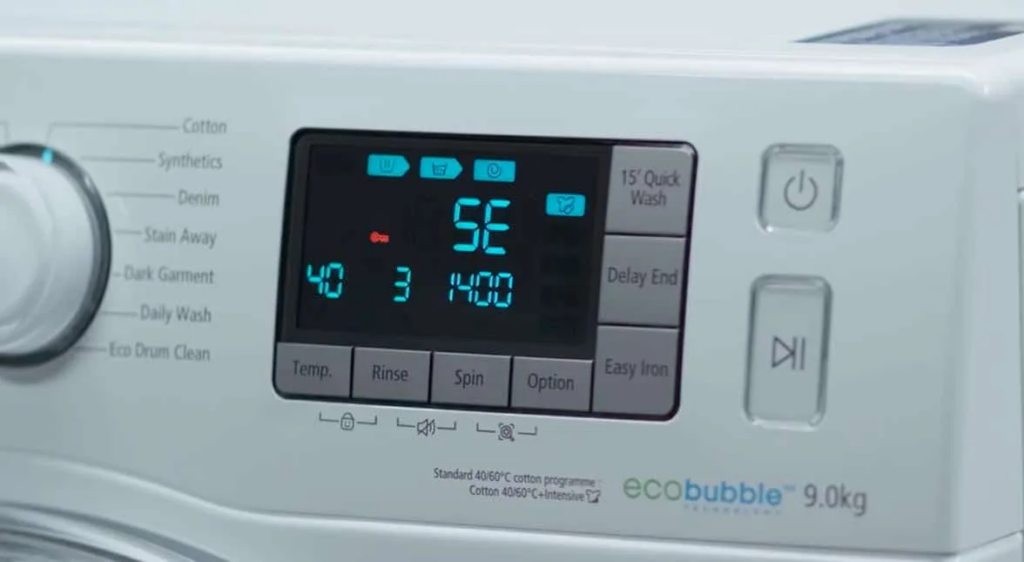

Samsung washing machines display error codes as two or three character combinations such as 4E, 5E, tE, UE, dE, LE, and SUD. Older Samsung models use E-number codes such as E1, E2, E3 instead. Both systems are used across the Samsung range – find your code in the relevant table below. The majority of Samsung error codes are caused by straightforward issues that can be resolved without an engineer.
Codes covered on this page
1E / 1C – Level sensor
5E / 5C – Drain
tE / tC / HE – Heating
dE / dC – Door
SE / 3E – Motor
8E – MEMS sensor
UE / UC – Unbalanced
OE / OF – Overflow
LE / lE – Leak
SUD / SUDS – Foam
bE – Button stuck
9E / FE – Power
AE – Comms
EE – EEPROM
CE – Cooling
Older E1 – E7
Why do Samsung machines use two different error code systems?
Samsung has used two distinct error code formats across its washing machine range, and both remain relevant because many older Samsung machines are still in daily use in UK homes. For broader brand context see our Samsung home appliances overview.
 Letter codes – 4E, 5E, tE, UE, dE (modern format)
Most Samsung washing machines produced from approximately 2010 onwards use letter-based codes. These typically consist of two characters – a number or letter followed by E or C (4E, 5E, tE, UE, dE, LE) or a word (SUD, SUDS). The letter E and letter C versions of the same code mean the same fault – 5E and 5C are the same drain fault. Use the main error code table below.
 E-number codes – E1, E2, E3 (older format)
Older Samsung washing machines use E followed by a single digit. E1 is a fill fault, E2 is a drain fault, E3 is an overflow, E4 is an unbalanced load, and so on. These correspond directly to the modern letter codes. A cross-reference table is provided further down this page so you can translate any E-number code to its modern equivalent.
 C codes as an alternative to E codes
On many Samsung models, the same fault will display as either 4E or 4C, either 5E or 5C, either tE or tC, depending on the model variant. The E and C versions are identical in meaning. Throughout this guide, both versions are listed together wherever they apply.
 Samsung EcoBubble owners
Samsung EcoBubble machines use the same error code system as the wider Samsung range, but the bubble generator system adds a small number of additional fault paths around the detergent draw and foam injection. See our Samsung EcoBubble overview for the technology explained.
Which Samsung codes are seen most often?
Across the field, four Samsung code groups account for the majority of fault callouts. Knowing which they are helps narrow the diagnosis before you open anything up.
Drain fault – almost always a blocked filter
Unbalanced – redistribute the load
Door interlock – common at 5-10 years
Foam – too much or wrong detergent
Samsung washing machine error codes – complete reference
Water supply and fill errors
| Error code | Fault description | Most likely causes | Check first |
|---|---|---|---|
| 4E / 4C nF / nF1 E1 |
Water supply error – machine not receiving enough water to run the cycle | Water tap closed or partially closed. Kinked or trapped inlet hose. Blocked inlet hose filter. Low mains water pressure. Frozen inlet hose or tap in cold conditions. Failed inlet valve solenoid. | Confirm the tap is fully open. Straighten the inlet hose. Unscrew the inlet hose from the back of the machine and clean the small mesh filter inside the inlet port. Check that water pressure at the tap is adequate. In cold weather, check the inlet hose and tap have not frozen. |
| 1E / 1C E7 |
Water level sensor fault – pressure switch or hose not reading correctly | Blocked or kinked pressure switch hose. Failed pressure switch. Soap suds or residue blocking the pressure system. Incorrect connection of the water level sensor. | Check the pressure switch hose for blockage or kinks. Run a service wash on a hot cycle to clear soap residue. If the hose is clear and the code persists, the pressure switch requires testing. |
Drain errors
| Error code | Fault description | Most likely causes | Check first |
|---|---|---|---|
| 5E / 5C E2 |
Drain error – machine unable to drain water within the expected time | Blocked pump filter (the most common cause by a significant margin). Kinked or obstructed drain hose. Standpipe too high. Foreign object blocking the pump impeller. Failed drain pump motor. | Clean the pump filter behind the small access panel at the bottom front of the machine. Place towels and a shallow tray in front before opening as water will flow out. Unscrew the filter anticlockwise, remove all debris, check the pump cavity for foreign objects such as coins, and refit firmly. See our dedicated guide – Samsung 5E error code – plus washing machine not draining and no blockage and still not draining. |
Heating and temperature errors
| Error code | Fault description | Most likely causes | Check first |
|---|---|---|---|
| tE / tC HE / HC E6 |
Heating or temperature sensor error – water not reaching target temperature or temperature reading incorrect | Failed NTC thermistor (temperature sensor). Wiring fault between thermistor and control board. Failed heating element. Limescale heavily fouling element or thermistor in hard water areas. Control board fault. | Test the NTC thermistor with a multimeter (approximately 30,000 ohms at room temperature, falling as temperature rises – open circuit confirms failure). Test the heating element for continuity. In hard water areas, run a descaling cycle before testing components – see how to descale a washing machine and limescale in washing machines. |
Door errors
| Error code | Fault description | Most likely causes | Check first |
|---|---|---|---|
| dE / dC DE / d5 dL / dF |
Door lock error – machine not detecting the door is locked | Door not fully closed. Obstruction in door seal preventing full closure. Failed door interlock mechanism. Wiring fault to the interlock. Broken door handle or catch preventing the door from latching properly. | Open and firmly close the door, ensuring no clothing is caught in the seal. If the door closes correctly and the code persists, test the door interlock for continuity. Door interlock replacement is a common repair – genuine Samsung parts available through our spare parts section. See our dedicated guide – Samsung dE error – and washing machine door won’t open. |
Motor and drive errors
| Error code | Fault description | Most likely causes | Check first |
|---|---|---|---|
| SE / E4 3E / 3E1 / 3E2 3E3 / 3E4 EA / EB |
Motor or drive system error – motor hall sensor fault or motor failure | Faulty motor hall sensor (most common on SE/3E codes). Defective motor. Motor driver PCB fault. Quiet Drive motor cover out of position (3E3/3E4 on applicable models). Wiring fault to motor. | Check whether the drum rotates freely by hand with the machine unplugged. If it does not, check for a foreign object trapped between the drum and the door seal. Modern Samsung washing machines (Digital Inverter Motor models) use brushless direct-drive technology – the hall sensor is the primary wear component rather than carbon brushes. Engineer diagnosis is typically required for motor and hall sensor faults. |
| 8E / 8C 8C1 |
MEMS sensor error – vibration sensor fault | Failed MEMS (Micro-Electro-Mechanical System) vibration sensor on the control board. The MEMS sensor monitors machine vibration to adjust the spin speed and detect unbalanced loads. Board fault. | Switch the machine off at the mains for 60 seconds and restart. If the code persists, the MEMS sensor or control board requires engineer diagnosis. |
Unbalanced load
| Error code | Fault description | Most likely causes | Check first |
|---|---|---|---|
| UE / UC DC / E4 |
Unbalanced load – machine cannot proceed to spin safely | Load not evenly distributed inside the drum. Single heavy item (duvet, large towel, jeans) creating an imbalance. Machine not level. Worn shock absorbers on older machines. | Open the door, redistribute the load manually so weight is spread around the drum, and restart the spin. On single heavy items, adding a couple of towels can help balance the load. Check the machine is level on all four feet. This code is not usually a machine fault – it is a safety feature operating correctly. |
Overflow and water level errors
| Error code | Fault description | Most likely causes | Check first |
|---|---|---|---|
| OE / OF E3 |
Overflow error – machine detecting water above the expected level | Inlet valve not closing fully, allowing water to continue entering. Failed pressure switch reading the level incorrectly. Pressure switch hose blocked causing a false high reading. Excessive suds causing the pressure system to read a higher water level. | Check whether water is visibly above the door seal level. If overfilling is confirmed, the inlet valve is the likely cause. If the level appears normal, test the pressure switch and check the pressure switch hose. If excessive foam is visible, run an empty rinse-and-spin cycle to clear it. |
Leak detection
| Error code | Fault description | Most likely causes | Check first |
|---|---|---|---|
| LE / LE1 lE / 1E |
Water leak detected – machine has detected moisture outside the drum or in the base | Small external leak at the water supply or drain connections. Over-sudsing from too much or wrong type of detergent causing foam to escape. Internal hose or clamp leak. Failed door seal leaking water around the door. Leak from the pump housing. | Inspect the area around the machine for visible water. Check all external hose connections are tight. If no external leak is visible, reduce detergent quantity and check you are using HE-rated detergent – see too much foam in washing machines. If suds are over-flowing, run an empty rinse-and-spin cycle. If LE persists with no visible leak, an internal hose inspection is required – see also cleaned the pump filter and now it leaks. |
Excess suds
| Error code | Fault description | Most likely causes | Check first |
|---|---|---|---|
| SUD / SUDS SD / 5UD |
Excessive suds detected – too much foam in the drum | Too much detergent used. Wrong type of detergent used – standard detergent rather than HE (High Efficiency) formula in a modern Samsung machine. Residual detergent build-up in the machine from previous over-dosing. | The machine will typically pause and attempt to resolve the foam by running additional rinse water before continuing. Do not open the door. Wait for the machine to clear the foam and resume. Once the cycle completes, reduce detergent quantity and use only HE-rated detergent on future washes. Run a hot empty service wash cycle to clear detergent residue from the drum and seals. |
Control panel and electrical errors
| Error code | Fault description | Most likely causes | Check first |
|---|---|---|---|
| bE / bE1 / bE2 bC1 / bC2 |
Button error – a button on the control panel is jammed or stuck | A button on the control panel is physically jammed in the pressed position, either from water ingress, detergent residue, or mechanical damage. Can also appear as a MEMS sensor error on some models. | Switch the machine off at the mains. With the machine off, press each button individually and work it back and forth to free any that feel sticky or do not spring back properly. Wipe the control panel with a dry cloth to clear any residue. Restart the machine. |
| 9E / 9C 9E1 |
Power frequency error – electrical supply frequency outside acceptable range | Mains supply frequency outside the normal 50Hz (UK standard). Voltage irregularity from the mains supply. Extension lead causing voltage drop. Poor earth connection. | Ensure the machine is connected directly to a wall socket rather than an extension lead. Check the socket and plug for signs of overheating or poor contact. If the code appears repeatedly, have the mains supply checked by an electrician. |
| AE / AC AC6 |
Communication error – fault in the communication between the main PCB and sub-board | Wiring harness fault between main board and secondary board. Failed main or sub board. Moisture on board connections. | Switch off at the mains for 60 seconds and restart. If the code persists, engineer diagnosis is required. |
| EE | EEPROM fault – control board memory error | Failure of the EEPROM memory chip on the main control board. Can be caused by power surge damage or age-related component failure. | Power cycle. If persistent, control board replacement required. Assess against machine age and repair cost – see repair or replace appliance. |
| FE | Frequency error – power supply frequency fault | Similar to 9E – mains supply frequency irregularity. Can also indicate a fault in the frequency sensing circuit on the board. | Confirm direct wall socket connection. If the code persists, engineer diagnosis required. |
| CE | Cooling error – appliance overheating (washer dryer models) | The appliance has detected an over-temperature condition. The fan will continue to run until the temperature drops. Can be caused by inadequate ventilation around the machine or a blocked cooling system. | Ensure adequate space around the machine for ventilation. Allow the machine to cool fully before restarting. Do not block the appliance’s ventilation areas. |
Older Samsung models – E-number to modern code cross-reference
If your Samsung washing machine displays E-number codes rather than the letter-based format above, use this table to find the modern equivalent and the relevant section in the guide above.
| Old E-number code | Modern equivalent | Fault type |
|---|---|---|
| E1 | 4E / 4C / nF | Water supply / fill fault |
| E2 | 5E / 5C | Drain fault |
| E3 | OE / OF | Overflow / water level too high |
| E4 | UE / UC | Unbalanced load |
| E5 | dE / dC | Door lock fault |
| E6 | tE / tC / HE / HC | Heating / temperature fault |
| E7 | 1E / 1C | Water level sensor fault |
| EA / EB | SE / 3E | Motor / drive fault |
What should you check before calling an engineer?
-
Power cycle the machine. Switch off at the wall socket, wait 60 seconds, and switch back on. Many Samsung error codes – particularly bE button errors, AE communication errors, and some 8E sensor codes – are caused by transient events that clear on restart. If the code does not return, monitor the machine over the next few cycles.
-
Clean the pump filter (5E, E2 drain codes). This resolves the majority of Samsung drain error codes. The pump filter is behind the small access panel at the bottom front of the machine. Place towels in front before opening – water will flow out. Unscrew the filter anticlockwise, remove all debris, check the pump cavity for foreign objects, and refit firmly.
-
Check the water supply (4E, E1 fill codes). Confirm the tap is fully open. Straighten the inlet hose. Clean the small mesh filter inside the inlet port at the back of the machine. In cold weather, check the hose or tap has not frozen.
-
Redistribute the load (UE, DC unbalanced codes). Open the door and manually distribute the laundry evenly around the drum before restarting the spin. This is not a machine fault – it is a safety feature. Adding a towel or two to a single heavy item helps balance the load.
-
Reduce detergent and run a rinse cycle (SUD, LE codes). If the machine is showing SUD or LE alongside visible foam, the issue is excess detergent. Run an empty rinse-and-spin cycle to clear the foam. Reduce detergent quantity on future washes and ensure you are using HE-rated detergent.
-
Check the door closes correctly (dE, DE door codes). Open and firmly close the door, ensuring no clothing is trapped in the seal. If the door closes correctly and the code persists, the door interlock requires testing.
-
Check the control panel buttons (bE codes). With the machine switched off, press each button firmly and check it springs back correctly. Work any stiff buttons back and forth gently. Clean the panel with a dry cloth.
Safety notice

Always switch the machine off at the wall socket and unplug it before accessing the pump filter, opening any panels, or inspecting internal components. Never work on any electrical components with the machine connected to the mains. Isolate the water supply at the inlet valve before disconnecting hoses.
A washing machine combines mains electricity with mains water – two of the most unforgiving things in a domestic setting. If you are not confident with electrical work or have any doubt about a fault, book a qualified engineer rather than attempt the repair yourself. See our full DIY appliance repair safety guide.
Samsung has been subject to UK product safety notices on other appliance categories – see for example the Samsung RS21 and RS60 fridge freezer safety notice. Always check the OPSS product safety database for any active recall affecting your specific Samsung model and serial number before continuing to use it.
Can you fix a Samsung error code yourself?
 Straightforward to check or fix yourself
- Cleaning the pump filter (5E drain code)
- Checking and cleaning the inlet hose filter (4E fill code)
- Redistributing the load (UE unbalanced code)
- Reducing detergent and clearing foam (SUD, LE codes)
- Power cycling to clear transient codes
- Checking the door closes correctly and testing the interlock (dE door code)
- Freeing a stuck control panel button (bE code)
- Replacing the door interlock on confirmed interlock failure
 Requires an engineer or advanced competence
- Motor and hall sensor faults (SE, 3E codes)
- MEMS sensor faults (8E)
- Control board communication faults (AE, EE)
- Overflow inlet valve faults (OE)
- Water level sensor faults (1E)
- NTC thermistor replacement (tE, HE) if descaling and basic checks have not resolved the fault
- Any fault that persists after all basic checks have been completed
Samsung error code pointing to a fault you cannot resolve?
If basic checks have not cleared the fault, a qualified engineer is the right next step. We cover Samsung washing machine repairs nationwide with genuine Samsung spare parts available for most models including door interlocks, drain pumps, heating elements, and NTC sensors.
Samsung dedicated guides
We have individual deeper-dive guides for the most common Samsung topics.
 Samsung 5E error code
Drain fault – blocked pump filter, drain hose, and pump motor checks.
 Samsung dE error
Door lock fault – close-and-confirm checks and interlock replacement.
Samsung EcoBubbleHow Samsung’s EcoBubble technology works and how it affects fault diagnosis on the bubble draw system.
 Samsung brand hub
Background on Samsung as an appliance brand, product positioning, and reliability context.
Samsung RS21 / RS60 safety noticeUK safety notice affecting certain Samsung fridge freezer models.
 Repair or replace?
How to decide whether a Samsung fault is worth repairing or whether replacement makes more economic sense.
Looking for error codes on a different brand?
We have error code references for the other major UK washing machine brands. Use the cards below to jump to the relevant guide.
LG error codesLG washing machine error code reference – the other major Korean brand.
Bosch error codesBosch washing machine E-code reference.
AEG error codesAEG Lavamat E-code reference.
Beko error codesBeko / Blomberg / Grundig error code reference.
Hotpoint error codesHotpoint F-code and flashing-light fault reference.
Candy error codesCandy washing machine error code reference.
Want to learn appliance fault diagnosis properly?
Reading error codes is one of the more basic skills in appliance repair. For anyone wanting to develop the full skill set – whether for a career, a side business, or just to repair their own appliances confidently – the NAC National Training Centre offers practical hands-on courses and online training delivered by working engineers.
Frequently asked questions about Samsung washing machine error codes
What does 5E mean on a Samsung washing machine?
5E (also shown as 5C or E2 on older models) is a drain fault code – the machine has been unable to drain water within the expected time. In the majority of cases this is caused by a blocked pump filter rather than a failed pump. The pump filter is behind a small access panel at the bottom front of the machine. Cleaning it takes around five minutes and resolves most 5E faults without any parts or engineer visit. If the filter is clear and the code persists, check the drain hose for kinks and confirm the standpipe height, then test the drain pump motor. See our dedicated guide – Samsung 5E error code.
What does 4E mean on a Samsung washing machine?
4E (also shown as 4C, nF, nF1, or E1 on older models) indicates a water supply fault – the machine is not receiving enough water to run the cycle. Check that the tap is fully open, the inlet hose is not kinked, and the small filter mesh inside the inlet port at the back of the machine is clean. In cold weather, the inlet hose or tap may have frozen. If the water supply checks out and 4E persists, the inlet valve solenoid has likely failed.
What does UE mean on a Samsung washing machine?
UE (also shown as DC or E4 on older models) indicates an unbalanced load – the machine has detected that the laundry is not evenly distributed and has stopped the spin cycle for safety reasons. This is not a machine fault. Open the door, redistribute the laundry evenly around the drum, and restart the spin. Adding a towel or two alongside a single heavy item such as a duvet or jeans helps balance the load. If UE appears repeatedly on normal loads with a balanced machine, worn shock absorbers may need investigation.
What does dE or DE mean on a Samsung washing machine?
dE or DE (also dC, d5, dL, dF) indicates a door lock error – the machine is not detecting that the door is securely locked. First confirm the door closes fully with nothing obstructing the seal. If it closes correctly and the code persists, the door interlock has likely failed and requires replacement. Door interlock replacement is a common and practical repair on Samsung washing machines – genuine replacement interlocks are available for most models. See our dedicated guide – Samsung dE error.
What does SUD or SUDS mean on a Samsung washing machine?
SUD or SUDS (also SD or 5UD on some models) indicates that the machine has detected excessive foam in the drum. The most common causes are using too much detergent, or using standard detergent rather than HE (High Efficiency) formula in a modern Samsung machine. The machine will typically pause and attempt to clear the foam by running additional rinse water before continuing. Do not open the door during this process. Once the cycle completes, reduce detergent quantity on future washes and ensure you are using HE-rated detergent.
What does tE mean on a Samsung washing machine?
tE (also tC, HE, HC, or E6 on older models) indicates a heating or temperature sensor error. The most common cause is a failed NTC thermistor. Test the thermistor with a multimeter – approximately 30,000 ohms at room temperature, falling as temperature increases. In hard water areas, run a descaling cycle before testing components, as limescale on the thermistor can cause this code without any component actually failing. If the thermistor and element both test correctly, the fault is in the wiring or control board.
What does LE mean on a Samsung washing machine?
LE (also LE1 or lE) indicates that the machine has detected a water leak. Check the area around the machine for visible water. Check that all external hose connections are tight. If over-sudsing is causing foam to escape from the machine, the LE code can be triggered without a genuine leak – reduce detergent and run an empty rinse-and-spin cycle. If LE persists with no visible external leak, an internal hose, pump, or door seal leak requires investigation.
Ask the repair forum
Post the make, model and symptoms and get help from the Whitegoods Help community.
0 Comments