
What does Hotpoint Error Code F05 mean?
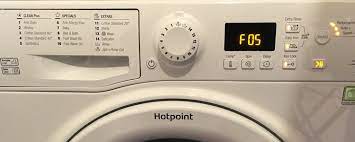

Hotpoint error code F05 on a Hotpoint or Indesit washing machine means the pressure switch is stuck in the “full” position – the machine thinks it still has water inside and refuses to spin. The most common cause is a blocked pump filter or drain hose. But the water draining away does not always clear the error – a blocked pressure tube can also keep the switch triggered even when the drum is empty. This guide explains all the causes and how to work through them.
Fault guide from Whitegoods Help – written with the expertise of our founding engineer’s 40 years of appliance repair experience.

Always unplug your washing machine from the mains before opening any access panels, touching the pump filter, or removing any hoses or tubes.
Some washing machine components can carry an electrical charge even after the machine appears to be off. If you are not confident working on electrical appliances, book a qualified engineer instead.
Which machines show the F05 error code?
F05 appears on a range of Hotpoint and Indesit washing machines – both brands are manufactured by the same company (now owned by Whirlpool following Indesit’s acquisition in 2014), which is why they share the same error code system.
The error appears in two ways depending on your model:
- Digital display models: the code “F05” appears on the display panel
- LED indicator models (no digital display): the 2nd and 4th indicator lights on the panel flash simultaneously

Many websites describe F05 simply as “a draining problem” or “the machine can’t empty the water.” This is misleading. Draining failure is the most common cause of F05, but it is not the only one. You can have a perfectly drained drum and still get F05. Understanding the correct explanation is essential for diagnosing and fixing this fault properly.
What does F05 actually mean?
F05 means the pressure switch is stuck in the “full” position – it is telling the machine there is water in the drum when there should not be.
The pressure switch has a critical safety job. Before a washing machine begins its spin cycle, it needs confirmation from the pressure switch that the drum is empty. If it spun with a full drum, water would be thrown out through the soap drawer, door seal and other openings. So the machine waits for that confirmation signal before spinning.
F05 means that signal is not arriving – the pressure switch is still reporting “full” when the machine expects to see “empty.”
There are three distinct reasons this can happen, and they require different approaches to fix:
| Cause | What is happening | Is water visible in the drum? |
|---|---|---|
| Drainage failure | The water has not pumped away – the drum genuinely still has water in it, and the pressure switch is correctly reporting full | Yes – water visible |
| Blocked pressure tube | The water has drained away, but a blockage in the thin pressure tube is trapping air pressure, keeping the switch triggered in the “full” position | No – drum is empty |
| Faulty pressure switch | The water has drained away and the tube is clear, but the switch itself is physically stuck and will not reset to “empty” | No – drum is empty |
Faulty wiring connections and, in rare cases, a faulty PCB (control board) are also listed as possible causes – but these should only be considered after all the above have been ruled out. Do not replace a PCB speculatively. On Hotpoint and Indesit machines, new modules are unprogrammed from the factory and require a dedicated smart card and reader to set up – a process that can cost over £200 on top of the part itself.
For more background on how washing machines control water levels, read our guide: how does a washing machine control water levels?
How to diagnose and fix the F05 error – step by step
Step 1: Is there water in the drum?
Look through the door. Is there visible water still in the drum? This is your first and most important question – it determines which path to follow.
If yes – water is still in the drum: the fault is a drainage failure. The pressure switch is doing its job correctly; the problem is that the water has not pumped away. Follow the steps below to clear the blockage.
If no – drum is empty but F05 is still showing: skip to Step 4. The drainage is working but the pressure switch is not resetting.
Step 2: Manually drain the machine
If there is water in the drum, you need to drain it before you can access the pump filter safely. Here is how:
-
Unplug the machine from the mains.
-
Open the small access panel at the bottom front of the machine. On most Hotpoint and Indesit models this is a rectangular flap that can be pulled open by hand or unscrewed.
-
Place a shallow tray or bowl on the floor in front of the panel, with some towels underneath.
-
Look for a small emergency drain hose tucked to one side of the filter cap. Pull out the end of this hose and remove its plug to allow water to flow into your bowl. Refill and empty the bowl until no more water comes out.
-
If there is no emergency drain hose, very slowly turn the filter cap anticlockwise – water will trickle out. Tighten it again, empty the bowl, and repeat until the drum is empty.
Step 3: Clean the pump filter
A blocked pump filter is the single most common cause of F05. Coins, hair clips, fluff, buttons and fabric debris all accumulate here and can prevent the pump from draining the drum properly.
-
With the drum now empty and the machine unplugged, unscrew the filter cap fully and remove it.
-
Pull the filter out – it may have debris wrapped around it or packed behind it.
-
Clean the filter thoroughly under a running tap.
-
Check inside the filter housing with a torch for any remaining debris, and check that the impeller (the small plastic wheel inside) can spin freely. If it is jammed, clear the obstruction.
-
Refit the filter cap firmly and close the access panel.
-
Also check the drain hose at the back of the machine – ensure it is not kinked, blocked, or pushed too far down the standpipe (it should be no more than 15cm into the standpipe).
-
Run a short spin cycle to test. If drainage completes and F05 does not return, the fault is resolved.
For more detail on this, see our full guide: washing machine won’t drain and washing machine pump filter guide.
Step 4: Check the pressure tube (if drum is empty but F05 persists)
If the drum is empty – either naturally or after cleaning the filter – but F05 is still showing, the pressure switch tube is the next place to check.
The pressure switch works using air pressure. A thin rubber or plastic tube runs from a small chamber at the bottom of the outer drum, up to the pressure switch. As water fills the drum, it compresses air in this tube, which pushes a diaphragm in the switch. When the water drains away, the air pressure should release and the switch should click back to “empty.”
If there is a blockage anywhere in this tube, the air pressure cannot escape – and the switch stays triggered in the “full” position even though the drum is empty.
Make sure the machine is unplugged before locating or touching the pressure switch or its tube.
To check the pressure tube:
-
Access the pressure switch – it is usually located near the top of the machine, behind the top panel or control panel. Remove the top panel (typically held by two screws at the rear) to access it.
-
Find the thin rubber tube running from the switch downwards toward the drum.
-
Carefully pull the tube off the base of the pressure switch.
-
If the tube was holding trapped air, you should hear an audible click as the pressure releases and the switch springs back to the “empty” position.
-
Inspect the tube for any visible blockage, kinks, splits or condensation.
-
If no click was heard, the pressure may have already slowly seeped out over time – this is normal if some time has passed since the fault occurred.
-
Reconnect the tube, refit the panel, plug the machine back in and run a test cycle.
For more detailed guidance on this: faults with the washing machine pressure system.
Step 5: Faulty pressure switch
If the drum is empty, the tube is clear and unblocked, but F05 still appears, the pressure switch itself may be faulty – stuck in the “on” position mechanically. A faulty pressure switch is relatively uncommon but does occur.
Replacement pressure switches for Hotpoint and Indesit machines are generally low-cost parts and widely available. However, confirming it is the switch and not the wiring or module first is important – check all wiring connections at the switch for signs of corrosion, burning or loose contacts before ordering a replacement part.
Find spare parts for your machine at our appliance spare parts finder.
Step 6: When to call an engineer
If you have worked through all of the above and F05 persists, the remaining possibilities – a faulty pump motor, wiring fault, or PCB issue – require test equipment and experience to diagnose safely. At this point, calling an engineer is the right move.
As noted above, do not replace the PCB speculatively. New control modules for Hotpoint and Indesit machines require a smart card programmer to initialise – a process that makes speculative replacement extremely costly.


Frequently asked questions
What does F05 mean on a Hotpoint washing machine?
F05 means the pressure switch is stuck in the “full” position – the machine thinks the drum still contains water and will not spin as a safety precaution. The most common cause is a blocked pump filter or drain hose preventing the water from draining properly. However, F05 can also appear even when the drum has drained successfully, if a blockage in the pressure tube is trapping air pressure and keeping the switch triggered.
What does F05 mean on an Indesit washing machine?
Exactly the same as on a Hotpoint – the two brands are made by the same manufacturer and share the same error code system. F05 on an Indesit washing machine means the pressure switch is jammed on “full.” Follow the same diagnostic steps described above.
Can I fix F05 myself?
In many cases, yes. If the cause is a blocked pump filter – the most common reason – this is a straightforward DIY task requiring no tools and no technical knowledge. Checking and cleaning the drain hose and pressure tube are also reasonable DIY steps. However, if the fault points to a faulty pump, pressure switch or wiring, and you are not confident working on electrical appliances, booking an engineer is the safer choice.
My washing machine drum is empty but F05 is still showing – why?
This usually means the pressure tube has a blockage that is trapping air pressure and keeping the pressure switch triggered in the “full” position, even though there is no water present. Removing the tube from the base of the pressure switch should release the trapped air with an audible click. If no click occurs, or if the error returns after clearing the tube, the pressure switch itself may be faulty.
How do I reset the F05 error on a Hotpoint washing machine?
There is no simple reset code that will clear F05 without addressing the underlying cause. Unplugging the machine for a few minutes may temporarily clear the display, but the error will return on the next cycle if the fault has not been resolved. You need to work through the diagnostic steps above to fix the root cause before the error will clear permanently.
Is F05 the same as F11 on a Hotpoint washing machine?
No. Both relate to drainage but they mean different things. F05 means the pressure switch is stuck on “full” – the machine is not receiving the signal that water has been removed. F11 means a direct fault has been detected with the drain pump circuit itself. If you have F11, check our washing machine not draining guide.
Ask the repair forum
Post the make, model and symptoms and get help from the Whitegoods Help community.
26 Comments
Grouped into 19 comment threads.
0 replies Great advice. First thing I checked was the waste pipe. Fully bunged up with hair, gunge and a pebble. Works fine now! Thanks, saved me a fortune!
1 reply F5 flashing checked all pipes ,pump all fine but noticed on wash cycle machine not filling with water,water tap is on but wmud 942 is not drawing water what can be wrong
F5 flashing checked all pipes ,pump all fine but noticed on wash cycle machine not filling with water,water tap is on but wmud 942 is not drawing water what can be wrong
Likely replying to Rohit
Hello Rohit. As my article describes, error F05 means the washing machine thinks it is full of water so I would expect that it wouldn’t take more water in.If the washing machine does not have water stuck inside then this error is likely to mean a problem with the pressure system. If the article above doesn’t help it would be best to get an engineer in to look at it.
1 reply Another thing to look out for! I changed the u bend and it came with an appliance outlet on the trap what I did not notice was the outlet was not pre drilled with a hole
Another thing to look out for! I changed the u bend and it came with an appliance outlet on the trap what I did not notice was the outlet was not pre drilled with a hole
0 replies Thanks for this thread. Had similar problem. I ran an empty cycle so I could see the water level and was clear it was not going down.....So checked the outlet hose and found that where it was connected to the sink was 99% blocked with limescale (and 1% with a sweet wrapper!): solved (with quite a lot of mopping up
Thanks for this thread. Had similar problem. I ran an empty cycle so I could see the water level and was clear it was not going down…..So checked the outlet hose and found that where it was connected to the sink was 99% blocked with limescale (and 1% with a sweet wrapper!): solved (with quite a lot of mopping up
0 replies Thanks so much for sharing your ideas and tips here, they have been very helpful and they do indeed relate to Indesit washing machines too. A few weeks ago my washing machine - an Indesit WITL 62 - began failing to complete its programme just before going in to the fast spin cycle with error F05. The pump was working but seemed to be pumping at a lower rate than what would seem reasonable. After searching the compartment in front of the pump and its output for blockage I looked at the pressure switch and the area where it forms an intersection with the output of the drum. There I found the culprit, a whole sock was in there! Thanks again for sharing your insight, it was due to this article that I looked at the pressure switch and was lead to check beneath the drum.
Thanks so much for sharing your ideas and tips here, they have been very helpful and they do indeed relate to Indesit washing machines too. A few weeks ago my washing machine – an Indesit WITL 62 – began failing to complete its programme just before going in to the fast spin cycle with error F05. The pump was working but seemed to be pumping at a lower rate than what would seem reasonable. After searching the compartment in front of the pump and its output for blockage I looked at the pressure switch and the area where it forms an intersection with the output of the drum. There I found the culprit, a whole sock was in there! Thanks again for sharing your insight, it was due to this article that I looked at the pressure switch and was lead to check beneath the drum.
0 replies F05 Means that the pump could be jammed with something like a cotton bud, hair band, bra cup wire etc. They jam the pump stop the m/c from emptying Access to the point where the pump is usually jammed is via the trap located bottom front of m/c. BEWARE it can get very messy if the machine is full of water, so best to have a rubber gloves, mob and buck, lots of old towels, old toothbrush and a large painting tray to hand. Steps to take Unplug m/c from mains. and if possible shut off water to m/c Remove the lower front kick panel of the m/c Partially unscrew trap to allow a little water at a time to escape into the tray and close off when tray is full, repeat until m/c is empty. When no more water comes out fully unscrew and remove trap. With rubber gloves on, reach in to see is any thing is fowling the plastic blades of the pump impeller and remove. When all items are removed, check to see if the impeller moves freely. If impeller is still not moving or no items found it is best to call an engineer as they pump or water level switch may be faulty. Before refitting the trap it is so clean the thread on the trap and machine with the old toothbrush then refit it make sure it is firmly. Don't over tighten or leave loose If you found items in the trap and impeller moves then you plug m/c to the mains, turn water back on and use normally. Otherwise wait for engineer. Finally remember before you do any washing, check and empty all pockets and remove cup wires from bras before washing!!
F05 Means that the pump could be jammed with something like a cotton bud, hair band, bra cup wire etc. They jam the pump stop the m/c from emptying Access to the point where the pump is usually jammed is via the trap located bottom front of m/c. BEWARE it can get very messy if the machine is full of water, so best to have a rubber gloves, mob and buck, lots of old towels, old toothbrush and a large painting tray to hand.
Steps to take
Unplug m/c from mains. and if possible shut off water to m/c
Remove the lower front kick panel of the m/c
Partially unscrew trap to allow a little water at a time to escape into the tray and close off when tray is full, repeat until m/c is empty.
When no more water comes out fully unscrew and remove trap.
With rubber gloves on, reach in to see is any thing is fowling the plastic blades of the pump impeller and remove.
When all items are removed, check to see if the impeller moves freely.
If impeller is still not moving or no items found it is best to call an engineer as they pump or water level switch may be faulty.
Before refitting the trap it is so clean the thread on the trap and machine with the old toothbrush then refit it make sure it is firmly. Don’t over tighten or leave loose
If you found items in the trap and impeller moves then you plug m/c to the mains, turn water back on and use normally. Otherwise wait for engineer.
Finally remember before you do any washing, check and empty all pockets and remove cup wires from bras before washing!!
0 replies WMEF742P F05 error. Phoned hotpot and was quoted 110 to 185 pounds to replace the pump, including labour. At the front, bottom right, behind a panel, there's a drain screw. Undid, water everywhere but found the culprit to be a mass of hair, with hair slides and two one penny coins. Removed all objects, set the wm to spin cycle and it's now spinning away, drying our clothes. Common sense, free.
WMEF742P F05 error. Phoned hotpot and was quoted 110 to 185 pounds to replace the pump, including labour. At the front, bottom right, behind a panel, there’s a drain screw. Undid, water everywhere but found the culprit to be a mass of hair, with hair slides and two one penny coins. Removed all objects, set the wm to spin cycle and it’s now spinning away, drying our clothes. Common sense, free.
1 reply Just had this fault and your answers directed me straight to the fault! Noisy pump and still full of water going into spin mode, took the inlet pipe of the pump and there was a 20p coin intermittently jamming the pump motor!
1 reply Thanks for this, my partner fitted a new sink trap, added complications were that the B &Q sink trap rather pointlessly had a black bung plug in it, my partner had fitted many of these things before, all seemed fine until this f05 error code was displayed ... thanks to google and white goods help, as my now exhausted partner went to sleep leaving me to cope with a load of washing which wouldn't drain, i set to dismantling the outlet hose from the new sink trap, expecting a gush of water from the pipe instead only a trickle it was then i looked inside to see the blockage, behold the pointless bung plug. Once that was removed all was good and ready to used a few pounds there and the embarrassment of my partner lol!!!
Thanks for this, my partner fitted a new sink trap, added complications were that the B &Q sink trap rather pointlessly had a black bung plug in it, my partner had fitted many of these things before, all seemed fine until this f05 error code was displayed … thanks to google and white goods help, as my now exhausted partner went to sleep leaving me to cope with a load of washing which wouldn’t drain, i set to dismantling the outlet hose from the new sink trap, expecting a gush of water from the pipe instead only a trickle it was then i looked inside to see the blockage, behold the pointless bung plug. Once that was removed all was good and ready to used a few pounds there and the embarrassment of my partner lol!!!
Likely replying to Jodie
Hello Jodie. That’s a great story, I’m sure he would have fixed it though if you had given him chance ;)
The bung by the way is there so that it can be fitted to the u-bend in preparation for a new appliance to be plumbed in, especially in a new house for example. Without the bung in place, the sink would be unusable because any water running into the sink would leak out of the spigot that the appliance is due to be connected to. It also serves a purpose if for example you move house, or disconnect the washing machine whilst waiting for a new one to be delivered. You can refit the bung and the sink will remain usable.
0 replies I had error f05 undid my very suck filter (all sorts of debris,bra bones pen lids etc) know a working washing machine yay thankyou x
I had error f05 undid my very suck filter (all sorts of debris,bra bones pen lids etc) know a working washing machine yay thankyou x
0 replies Thank you awesome people as following your advice above I have just fixed my machine by myself :)
Thank you awesome people as following your advice above I have just fixed my machine by myself :)
1 reply F05 error showing, I can see the water hasn't drained. Door is locked what can I do?
0 replies Mandy: There are links at the bottom of the article explaining all about pressure switches.
Mandy: There are links at the bottom of the article explaining all about pressure switches.
0 replies It sounds complicated Mike. If you’ve eliminated the pressure switch and pressure chamber blockages then other faults listed as possible causes for this error are faulty connections and even the pcb, which I wouldn’t advise replacing. They are expensive, many need specialist software to set up and if it isn't the pcb you can't send it back. If the door lock is not releasing it could be a pcb not releasing the power unless by any chance the door lock has a pneumatic air lock to it which would tie in with a blocked pressure syste. If you door lock is locked by air pressure when water is in the machine (rare now) it would have a pressure tubing attached to it as described in this article different types of door locks There is a company called QER who can check and repair washing machine pcbs if you are determined.
It sounds complicated Mike. If you’ve eliminated the pressure switch and pressure chamber blockages then other faults listed as possible causes for this error are faulty connections and even the pcb, which I wouldn’t advise replacing. They are expensive, many need specialist software to set up and if it isn’t the pcb you can’t send it back. If the door lock is not releasing it could be a pcb not releasing the power unless by any chance the door lock has a pneumatic air lock to it which would tie in with a blocked pressure syste. If you door lock is locked by air pressure when water is in the machine (rare now) it would have a pressure tubing attached to it as described in this article different types of door locks
There is a company called QER who can check and repair washing machine pcbs if you are determined.
0 replies Could somebody please tell me how I find the pressure switch on a hotpoint washing machine please
Could somebody please tell me how I find the pressure switch on a hotpoint washing machine please
0 replies Trying to get our Aqualtis AQ113D697I back to life after an F05. The initial fault was clearly a blocked pump, so that was cleared, the pump cleaned and the machine pumped out fine. However then the machine would not enter spin or release the door. I removed the level/pressure tube and blew down it (no obstruction) then replaced the pressure switch for good measure. Machine ran through a test cycle to end but left the door lock on. Manual released the door, the water had pumped out. If not the pressure sensor what is convincing the machine it is full of water when it isn't ?
Trying to get our Aqualtis AQ113D697I back to life after an F05. The initial fault was clearly a blocked pump, so that was cleared, the pump cleaned and the machine pumped out fine. However then the machine would not enter spin or release the door. I removed the level/pressure tube and blew down it (no obstruction) then replaced the pressure switch for good measure. Machine ran through a test cycle to end but left the door lock on. Manual released the door, the water had pumped out. If not the pressure sensor what is convincing the machine it is full of water when it isn’t ?
1 reply Hi, I have fo5 flashing on my machine. I emptied the drum manually and found a fair amount of debris when I unscrewed the valve at the bottom of the machine. Thought this had sorted it but now I still get f05 but the machine cycle wont start, seems to have trouble filling up and stays locked. Is there anything else I can try? Thanks
Hi, I have fo5 flashing on my machine. I emptied the drum manually and found a fair amount of debris when I unscrewed the valve at the bottom of the machine. Thought this had sorted it but now I still get f05 but the machine cycle wont start, seems to have trouble filling up and stays locked. Is there anything else I can try? Thanks
Likely replying to bernie
Hello Bernie, the F05 error isn’t caused by a pump blockage, it’s can be a blockage in the pressure system which tells the washer when the water has gone but it can be other things too. To troubleshoot this error you need to understand how the pressure system works using the links at the bottom of the article.
0 replies Sorry Andy. I should have said pump motor, not just motor. During investigation, I found sludge on the wrong side of the impeller shaft. Since the pump assy was inexpensive, I thought I would change it and keep the postage to one parcel. The machine flips between F08 and F05 and sometimes goes all the way through. I have tried various loads to rule out a balance problem, with little success. I have noticed though, reducing the spin speed to below 1400 normally helps it spin through. From this I surmise it is a software thing, perhaps the out of balance algorithm is less critical when not at full speed. (just a thought) I have also noticed that sometimes I get 6 beeps, like the child lock warning, and sometimes the door lock clicks 5 times after a fault reset (unplug - plug). It is this lack of consistency, coupled with the knowledge that the machine is not blocked, mechanically or filter wise, amnd that the pressure switch is new, that leads me to think it is the computer.
Sorry Andy. I should have said pump motor, not just motor. During investigation, I found sludge on the wrong side of the impeller shaft. Since the pump assy was inexpensive, I thought I would change it and keep the postage to one parcel. The machine flips between F08 and F05 and sometimes goes all the way through. I have tried various loads to rule out a balance problem, with little success. I have noticed though, reducing the spin speed to below 1400 normally helps it spin through. From this I surmise it is a software thing, perhaps the out of balance algorithm is less critical when not at full speed. (just a thought)
I have also noticed that sometimes I get 6 beeps, like the child lock warning, and sometimes the door lock clicks 5 times after a fault reset (unplug – plug).
It is this lack of consistency, coupled with the knowledge that the machine is not blocked, mechanically or filter wise, amnd that the pressure switch is new, that leads me to think it is the computer.
1 reply Hi, I have this fault on a Hotpoint Aqualtis AQ XXD169. I have replaced the pressure switch and motor and cleaned all the tubes etc. (which were not blocked by the way). I have con checked the switch (single switch, 3 wires) and it functions correctly, as does the old one. Can I now assume this is likely to be the PCB i.e. where that signal goes to? The machine will not pass through to the full spin, it gets stuck in the balance phase. However, it is not a permanent fault, just intermittent. Additional info - During the strip of the machine I noted very lttle scale and gunge build up, but the pump had some leakage across the drive shaft to the void space between the impeller and the motor. The pump has now been replaced. Machine has had light use (2 people over 5 years).
Hi, I have this fault on a Hotpoint Aqualtis AQ XXD169. I have replaced the pressure switch and motor and cleaned all the tubes etc. (which were not blocked by the way). I have con checked the switch (single switch, 3 wires) and it functions correctly, as does the old one. Can I now assume this is likely to be the PCB i.e. where that signal goes to? The machine will not pass through to the full spin, it gets stuck in the balance phase. However, it is not a permanent fault, just intermittent. Additional info – During the strip of the machine I noted very lttle scale and gunge build up, but the pump had some leakage across the drive shaft to the void space between the impeller and the motor. The pump has now been replaced. Machine has had light use (2 people over 5 years).
Likely replying to Kev Peard
Hi Kev, can’t think why you’d think the motor was related to an F05 error code, hope it didn’t cost much. The pcb is suspect after you’ve checked the pressure system and switch but it’s always risky buying expensive parts which can’t be returned if it doesn’t fix the fault.
If washer gets occasionally stuck on the balance section before spin it can be an out of balanced load. If it gives the F05 error though then it won’t be.
Great advice. First thing I checked was the waste pipe. Fully bunged up with hair, gunge and a pebble. Works fine now! Thanks, saved me a fortune!