
Dishwasher Leaving White Marks on Glasses
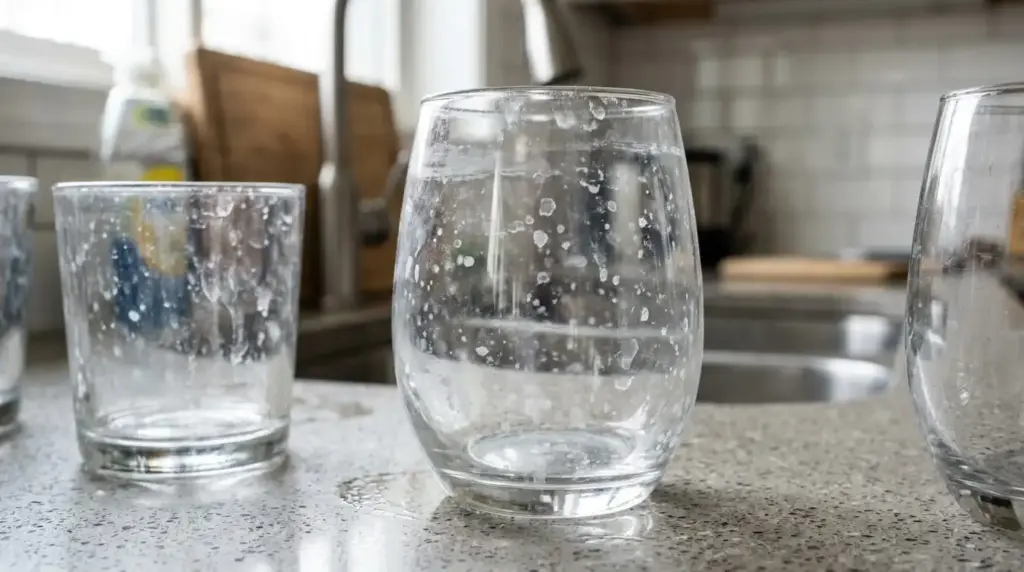

White marks and cloudy residue on glasses and dishes after a dishwasher cycle are almost always caused by one of three things – hard water limescale depositing on surfaces, depleted rinse aid or salt allowing water to dry in droplets, or glass etching caused by soft water or excessive detergent. The first two are easily resolved. The third is permanent damage. This guide tells you which one you are dealing with and what to do about it.
Why is your dishwasher leaving white marks?
White marks, cloudy films, and chalky residue on glasses and dishes after a dishwasher cycle are one of the most common complaints from dishwasher users in the UK, and one of the most frequently misunderstood. Most people assume the dishwasher is faulty. In the vast majority of cases it is not. The cause is almost always connected to water hardness, the consumables being used, or how the machine is being maintained. For a broader overview of dishwasher operation, performance, and maintenance, see our dishwashers hub.
There are two entirely different problems that produce similar-looking white marks, and it is important to identify which one you have before trying to fix it. One is reversible. The other is permanent damage to the glass itself.
 Limescale and mineral deposits
Hard water contains dissolved calcium and magnesium minerals. When water evaporates from glass surfaces during the drying cycle, these minerals are left behind as a white, chalky, or cloudy film. This is limescale. It looks like permanent damage but it is not. It can be removed with an acid-based cleaner or white vinegar, and it can be prevented by keeping rinse aid and salt topped up and maintaining the machine correctly. This is by far the most common cause of white marks on dishwasher glasses in the UK. For background, see our coverage of limescale in appliances.
 Glass etching
Glass etching is actual physical damage to the surface of the glass caused by alkaline dishwasher detergent progressively dissolving the silica in the glass over many wash cycles. It produces a cloudy, iridescent haze that sits within the glass surface rather than on it. Unlike limescale, etching cannot be removed. It is permanent. Etching is more common in soft water areas, with excessive detergent dosing, on very delicate glassware, and on glasses that are washed at high temperatures repeatedly. If etching is the cause, the glasses are permanently damaged.
The four causes ranked by how likely they are
Across UK households, four causes account for nearly all white-mark complaints. Knowing which is most likely helps narrow the diagnosis before you change anything.
Hard water limescale – the most common UK cause by far
Depleted rinse aid or dishwasher salt
Glass etching – permanent damage from detergent and heat
Detergent residue or dishwasher component fault
Is it limescale or glass etching? Do this test first
Before doing anything else, carry out this simple test to determine which problem you have. It takes less than a minute and determines whether the damage is reversible or permanent.
-
Take one of the affected glasses and dip your finger in white vinegar or lemon juice.
-
Rub the vinegar or lemon juice onto the cloudy area of the glass and leave it for a minute.
-
Rinse the area with clean water and dry it with a clean cloth.
-
Inspect the glass. If the cloudiness has reduced or disappeared where you applied the vinegar, the cause is limescale. The mineral deposits have dissolved in the acid, which is exactly what limescale does. Follow the solutions in the limescale section below.
-
If the cloudiness has not changed at all, the surface is unaffected by acid, which means the haze is inside the glass rather than on it. This is glass etching. The damage is permanent. The glasses cannot be restored.
Cause 1 – hard water and limescale deposits
The UK has some of the hardest water in Europe, particularly in the South East, the Midlands, and East Anglia. Hard water contains dissolved calcium carbonate and magnesium salts that are harmless to drink but cause significant problems in any appliance that heats water and allows it to evaporate, including dishwashers, kettles, washing machines, and coffee machines. For an in-depth look at how the same mineral chemistry affects washing machines, see how to descale a washing machine in hard water areas.
In a dishwasher, the problem manifests most visibly on glassware because glass is transparent and even a thin film of mineral residue is immediately obvious. The same deposits form on the inside of the machine, on the spray arms, and on the heating element, all of which progressively impair the machine’s performance if not addressed.
Fix 1 – refill the rinse aid
Rinse aid is the most important weapon against limescale marks on glassware. It works by reducing the surface tension of the rinse water, causing it to form thin sheets that run off glass surfaces cleanly rather than sitting in droplets that evaporate and leave mineral residue behind. Without rinse aid, even moderately hard water will leave white marks on glasses after the drying cycle.
Check the rinse aid indicator on the inside of the dishwasher door. Most machines show a small float in a transparent window that drops as the rinse aid level falls, or a dashboard light when the reservoir needs refilling. If the rinse aid is low or empty, refill it and run a full cycle. The improvement in glass clarity should be immediate.
Also check the rinse aid dosing setting, which is usually a dial inside the dispenser cap or a setting in the machine’s menu. In hard water areas, the dosing level should be set higher than the factory default to ensure sufficient rinse aid is released per cycle to counteract the mineral content of the water.
Fix 2 – refill the dishwasher salt
Dishwasher salt feeds the machine’s built-in water softener, which removes calcium and magnesium ions from the water before it is used for washing and rinsing. In hard water areas, keeping the salt reservoir full is essential for protecting both the glassware and the machine itself. Without sufficient salt, the water softener cannot function and hard water passes through the machine untreated.
The salt reservoir is at the bottom of the dishwasher interior, usually beneath the lower basket. It requires coarse granular dishwasher salt, not table salt or any other type. When refilling, some water may overflow from the reservoir – this is normal. Run a cycle after refilling before loading the machine with glassware, as the first cycle after a refill can occasionally leave a slight salt residue if the reservoir cap is not sealed properly.
The salt indicator light on the dashboard will alert you when the reservoir is nearly empty. In hard water areas, checking and refilling the salt every two to four weeks is sensible routine maintenance.
Fix 3 – descale the machine
If limescale has already built up inside the dishwasher, on the spray arms, heating element, and interior walls, a descaling cycle will remove it and restore the machine’s performance. Place a dishwasher descaler tablet or a cup of white vinegar in an upright container on the lower basket and run an empty cycle on the hottest programme available. Do not combine descaler with regular dishwasher detergent or tablets.
In hard water areas, running a descaling cycle every one to three months is good practice regardless of whether visible problems have developed. Our full guide to how to clean a dishwasher covers descaling and full maintenance in detail.
Fix 4 – wash affected glasses by hand to remove existing marks
To remove limescale marks that have already formed on glasses, soak the affected items in a solution of warm water and white vinegar for fifteen to thirty minutes, then rinse and dry. Alternatively, rub the marks with a cloth dampened with lemon juice, leave for a few minutes, then rinse thoroughly. Both methods use mild acid to dissolve the calcium deposits without damaging the glass surface.
Cause 2 – glass etching
If the vinegar test confirmed that the cloudiness on your glasses is glass etching rather than limescale, the news is unfortunately that the damage is permanent. No cleaning product, however powerful, will restore etched glass because the haze is not a surface deposit – it is the result of the glass surface itself having been progressively dissolved by alkaline dishwasher chemistry over many wash cycles.
Etching is most common in soft water areas, where the absence of calcium in the water means alkaline detergent has nothing to react with except the glass itself. It is also caused by excessive detergent dosing, very high wash temperatures applied repeatedly to delicate glassware, and older or cheaper glassware that is less resistant to dishwasher conditions.
How do you prevent further etching?
While you cannot repair etched glasses, you can prevent the same problem developing on other glassware in the future.

The most common cause of etching in average to soft water areas is using too much detergent. Many users fill the detergent compartment completely for every cycle, but manufacturers typically design the compartment to hold more than is needed for a standard load. If you use loose powder or gel, try reducing the amount by a third to a half and see whether cleaning performance is maintained. If you use all-in-one tablets, consider switching to a lower-strength or standard tablet rather than ultra-concentrated formulas. See our pieces on which is the best dishwasher detergent and calibrated dishwasher detergent dosing for more on the dosing question.

High temperatures accelerate the etching process. Use a glass or delicate programme for wine glasses, crystal, and other thin or decorative glassware. These programmes typically run at 40 to 45 degrees Celsius rather than the 65 degrees of a standard programme, significantly reducing the chemical aggression the glass is exposed to per cycle.

Rinse aid helps water sheet off glass surfaces quickly, reducing the time alkaline wash chemistry remains in contact with the glass surface during the rinse and dry phases. Keeping rinse aid at the correct level is as important for preventing etching as it is for preventing limescale marks.

Wine glasses, crystal, vintage pieces, and any other glassware with sentimental or monetary value should be hand washed. No matter how carefully a dishwasher is maintained, repeated exposure to alkaline detergent and high temperatures will eventually etch most glassware. The dishwasher is practical for everyday glasses – your best glasses deserve individual attention.
Cause 3 – incorrect detergent or dosing
Beyond the etching risk, incorrect detergent use can also simply leave white or grey residue on glassware without causing structural etching. This happens when detergent does not fully dissolve and rinse away during the cycle, leaving a soapy or powdery film on glass surfaces.
Common causes include – loading glasses upside down so the detergent wash cannot fully rinse the interior, using detergent that is past its use-by date or has been stored in a damp environment and has clumped, running a short or eco cycle that does not use enough water temperature to fully activate or rinse away concentrated detergent tablets, or using the wrong product entirely (some users have mistakenly used washing-up liquid in a dishwasher, which produces foam that interferes with the wash action and leaves a soapy residue on everything).
If you suspect detergent residue rather than limescale or etching, running an empty cycle on the hottest programme with no detergent added will rinse the machine interior clean, and then running a normal cycle with fresh detergent should restore clean results. If the white marks come alongside dishes that are simply not getting clean, the issue may go beyond the rinse alone – see dishwasher not cleaning dishes properly for the wider diagnostic walk-through.
Cause 4 – could the dishwasher itself have a fault?
In most cases, white marks on glasses are a maintenance or consumable issue rather than a machine fault. But if you have topped up the rinse aid and salt, descaled the machine, checked your detergent, and are still getting consistent white marks on every cycle, the machine may have a fault worth investigating.

If the spray arms are partially blocked with food debris or limescale, the rinse water does not reach all areas of the load evenly and mineral residue is left on surfaces that did not receive a full rinse. Remove the spray arms, rinse them under a tap, and use a toothpick to clear any blocked spray holes. The upper and lower spray arms should both be checked. A spray arm that has been physically damaged and cannot rotate freely will leave noticeably uneven results across the load.

If the rinse aid dispenser is full but marks are still appearing, the dispenser itself may be faulty and not releasing rinse aid during the rinse cycle. You can check whether the dispenser is functioning by loading the machine with glasses, confirming the rinse aid is full, running a cycle, and then checking whether the rinse aid level has dropped. If it has not dropped at all, the dispenser mechanism may need attention.
The final rinse needs to be very hot to help water evaporate from glass surfaces quickly during drying. If the thermostat is faulty and the final rinse temperature is lower than intended, water sits on glass surfaces for longer and leaves more mineral residue. A gradually worsening problem with white marks, where the machine previously produced clean glasses but now consistently does not, can indicate a thermostat that is failing progressively. An engineer can test rinse cycle temperatures.

A heavily blocked dishwasher filter reduces water circulation pressure, which means less water reaches the upper basket where most glassware sits. The result is poor rinsing of glasses and consistent white marks even when consumables are correctly maintained. Check and clean the filter at the base of the dishwasher interior at least monthly. It should lift or unscrew and can be rinsed under a tap.
White marks on glasses – quick fault finder
| What you see | Most likely cause | Action |
|---|---|---|
| White chalky film, wiped off with vinegar | Hard water limescale deposits | Refill rinse aid and salt, descale machine |
| Cloudy haze, not removed by vinegar | Glass etching – permanent damage | Reduce detergent dose, use glass programme, hand wash valued items |
| Marks appeared suddenly after previously clean results | Rinse aid or salt has run out | Check and refill both dispensers immediately |
| White marks on glasses but not on plates or cutlery | Upper basket rinsing issue or glass-specific etching | Check spray arm reaches upper basket, check detergent dose |
| White film across everything including plates and cutlery | Heavy limescale build-up inside machine | Descale machine, refill salt and rinse aid, increase salt dose setting |
| Soapy or powdery white residue | Detergent not fully dissolving or rinsing | Check loading orientation, check cycle is appropriate for detergent type |
| Marks getting gradually worse over months | Limescale build-up or slowly failing thermostat | Descale, check rinse aid dose setting, consider engineer if marks persist |
| Error code showing alongside marks | Component fault identified by machine | Look up code in our error codes guide |
How do you keep your dishwasher glasses spotless?
-

Never let the rinse aid run out. Refill it before the indicator light comes on, not after. In hard water areas, increase the dose setting to compensate for the mineral content of the water. -
Keep the salt reservoir topped up. Check it monthly in hard water areas and refill when the indicator shows low. Always use coarse dishwasher salt, not table salt. -
Clean the filter monthly. A blocked filter reduces water circulation and leaves residue on glasses. It takes two minutes to remove, rinse, and refit. -
Clean the spray arms every few months. Remove them, rinse under a tap, and clear any blocked spray holes with a toothpick to ensure even water distribution to all areas of the load. -
Run a descaling cycle every one to three months in hard water areas. An empty hot cycle with a descaler tablet keeps limescale from accumulating inside the machine and on internal components. -
Do not overdose on detergent. More detergent does not mean cleaner dishes. It increases the risk of etching, particularly in soft water areas, and can leave residue if the cycle does not fully rinse it away. -
Use a glass programme for delicate glassware. Lower temperature and gentler action reduces etching risk significantly on wine glasses, crystal, and decorative glassware. -
Open the door slightly after the cycle ends. Releasing steam immediately at the end of the cycle reduces the time water sits on glass surfaces, improving drying and reducing mineral residue.
Safety notice context
Dishwashers have been the subject of multiple UK product safety notices in recent years, primarily for fire-risk faults rather than performance issues. While white marks on glasses are not themselves a safety issue, while you have the machine open for inspection it is worth checking your model number against the UK safety database. Relevant historical notices include the Bosch, Neff and Siemens dishwasher safety notice, the Electrolux, AEG and Zanussi dishwasher safety notice, the Hotpoint dishwasher safety notice, the Hotpoint DWF dishwasher fire risk, and the John Lewis JLDWW1201 dishwasher safety recall. Always check the OPSS product safety database for any active recall affecting your specific make, model, and serial number.
Marks still appearing after all these checks?
If rinse aid and salt are both full, the machine has been descaled, and you are still getting consistent white marks, a component fault such as a blocked or faulty rinse aid dispenser, a spray arm issue, or a thermostat fault may be responsible. Our engineers cover dishwasher repairs across all major brands nationwide, with genuine spare parts available for most models.
Related dishwasher guides
If your dishwasher has additional symptoms alongside the white marks, the following dedicated guides cover the specific topic in more depth.
How to clean a dishwasherComplete cleaning, descaling, and maintenance walk-through for any dishwasher.
 Not cleaning properly
Diagnostic walk-through when dishes are coming out dirty as well as cloudy.
Not drainingPump filter, drain hose, and pump motor checks when water is left in the machine.
 Whistling noise
Causes and fixes for whistling, squealing, and other unusual dishwasher noises.
 Best dishwasher detergent
How to choose the right detergent for your dishwasher, water hardness, and load type.
 Dishwashers hub
All Whitegoods Help dishwasher coverage in one place – buying, faults, maintenance.
Want to learn appliance fault diagnosis properly?
Dishwasher diagnostics – rinse aid systems, water softener salt regeneration, spray arm circulation, and thermostat behaviour – is core appliance repair work. For anyone wanting to develop the full skill set, the NAC National Training Centre offers practical hands-on courses and online training delivered by working engineers.
Frequently asked questions about white marks on dishwasher glasses
Why does my dishwasher leave white marks on glasses?
The most common cause is hard water limescale – dissolved minerals in the water are left on glass surfaces when the rinse water evaporates during drying. This is almost always connected to depleted rinse aid or dishwasher salt, or to limescale build-up inside the machine that needs descaling. The other possible cause is glass etching, which is permanent damage to the glass surface caused by alkaline dishwasher detergent. Do the vinegar test described in this article to find out which problem you have before attempting a fix.
How do I tell the difference between limescale and glass etching?
Rub a small amount of white vinegar onto the cloudy area and leave it for a minute, then rinse. If the cloudiness reduces or disappears, it is limescale, which dissolves in acid. If the cloudiness is completely unchanged, it is glass etching, which sits within the glass surface itself and is not affected by acid. This test takes less than two minutes and determines whether the damage is reversible or permanent before you spend time and money on cleaning products.
Can etched glasses be restored?
No. Glass etching is permanent physical damage to the glass surface and cannot be reversed by any cleaning product or process. The alkaline chemistry of dishwasher detergent has progressively dissolved microscopic amounts of the silica in the glass over many wash cycles, producing the characteristic iridescent haze. Once etched, the glasses cannot be restored. You can prevent further etching on other glassware by reducing your detergent dose, using a glass programme for delicate items, and keeping rinse aid topped up.
Does rinse aid really stop white marks on glasses?
Yes, significantly. Rinse aid reduces the surface tension of the final rinse water, causing it to sheet off glass surfaces in thin films rather than pooling in droplets. When droplets evaporate they leave the minerals they contain behind as white marks. With rinse aid, the water runs off cleanly and far less mineral residue is left on surfaces. In hard water areas, the difference between a machine with full rinse aid at the correct dose setting and one with no rinse aid is very noticeable on every cycle.
Do I need dishwasher salt if I use all-in-one tablets?
In soft to medium water areas, all-in-one tablets that include a salt substitute may be sufficient. In hard water areas, they are generally not enough. The salt substitute in combined tablets is not as effective as the machine’s built-in water softener functioning properly with a full salt reservoir, and in areas with high water hardness, running without dedicated dishwasher salt will lead to progressive limescale build-up and deteriorating glass quality over time. Check the hardness of your local water supply – your water supplier’s website will show this – and if you are in a hard water area, use dedicated dishwasher salt regardless of which detergent tablets you choose.
How do I remove existing white marks from glasses?
If the vinegar test confirms the marks are limescale rather than etching, soak the affected glasses in a solution of warm water and white vinegar for fifteen to thirty minutes, then rinse thoroughly and dry with a clean cloth. Alternatively, rub the affected areas with a cloth dampened with lemon juice, leave for a few minutes, then rinse. Both methods use mild acid to dissolve the calcium deposits. For stubborn limescale, a proprietary glass descaler or citric acid solution may be more effective than vinegar alone.
Why are my glasses getting worse even though I use rinse aid?
Several things can cause deteriorating glass quality even with rinse aid in the machine. The rinse aid dose setting may be too low for your water hardness and should be increased. The rinse aid dispenser itself may be faulty and not releasing rinse aid during the rinse cycle. Limescale may have built up inside the machine to the point where a descaling cycle is overdue. The salt reservoir may be depleted. Or, if the water in your area is soft, the problem may be glass etching developing on the glassware itself rather than a limescale issue. Work through the checks in this article systematically to identify which of these applies.
Could the white marks indicate a dishwasher safety issue?
White marks themselves are a performance and water-quality issue rather than a safety one. However, several UK dishwasher models have been subject to active safety notices for fire-risk faults that are unrelated to the marks but worth being aware of. If you have your machine open for any reason, check your make and model against the relevant UK safety notice and the OPSS product safety database.
Ask the repair forum
Post the make, model and symptoms and get help from the Whitegoods Help community.
0 Comments